


- Học kỳ
- SU2026
- Thời Gian
- 7/8/26
- Loại tài liệu
- PE
HSF302 SU26 PE RE
Practical Exam for 2026 Summer - HSF302
This document outlines the practical examination for the HSF302 Working with Spring Framework course for Summer 2026. It details the project requirements, database schema, functional requirements for artifact management, and configuration instructions for building the Spring Boot application.Practical Exam for 2026 Summer - HSF302
1. Practical Exam for 2026 Summer - Page #02
Subject Code: HSF302
Subject Name: Working with Spring Framework
Time: 90 minutes (include submit time)
Exam Type: EOS Practical Exam
Note
a) Allow student to connect to Internet within 10 minutes when setting up project at the beginning examination
b) Student can only use resources in local computer
2. Exam Requirements
Develop the following page in Spring Boot 3.5.16, Spring JPA, and Spring MVC 6 and Thymeleaf run on JDK 21
Project Code: AMG
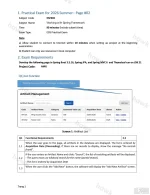
Q1) List function
Q1 Functional Requirements
1.1 When the user goes to the page, all artifacts in the database are displayed. The list is ordered by Acquisition Date (Descending). If there are no records to display, show the message "No records found".
1.2 If the user enters an Artifact Name and clicks "Search", the list of matching artifacts will be displayed.
- The query must use wildcard search for the name (partial match).
- The list is ordered by Acquisition Date
1.3 When the user clicks the "Add New" button, the software will display the "Add New Artifact" screen.
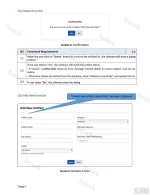
Q2) Delete function
Q2 Functional Requirements
2.1 When the user click on "Delete" button in a row on the artifact list , the software will show a dialog confirm
2.2 If the user selects "Yes", the software will check the artifact status:
- If "status" is Active (AC): Show an error message "Cannot delete an active artifact." and do not delete.
- Otherwise: Delete the artifact from the database, show "Deleted successfully", and update the list.
2.3 If user select "No", the software close the dialog
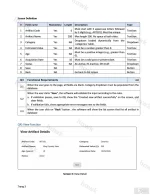
Q3) Add New function
Screen Definition
# | Field name | Mandatory | Length | Description | Type
1 | Artifact Code | Yes | 6 | Must start with 3 uppercase letters followed by 3 digits (e.g., ART101). Must be unique. | Text box
2 | Artifact Name | Yes | 200 | Max length 200. No space at both sides. | Text box
3 | Category | Yes | NA | Dropdown loaded dynamically from the `categories` table. | Dropdown
4 | Estimated Value | Yes | NA | Must be a number greater than 0. | Text box
5 | Age | Yes | NA | Must be a positive integer (e.g., greater than 0). | Text box
6 | Acquisition Date | Yes | 10 | Must be a valid past or present date. | Text box
7 | Status | Yes | NA | AC-Active, IN-Inactive, DR-Draft | Dropdown
8 | Save | NA | NA | | Button
9 | Back | NA | NA | Go back to list screen | Button
Q3 Functional Requirements
3.1 When the user goes to the page, all fields are blank. Category dropdown must be populated from the database.
3.2 When the user clicks "Save", the software will validate the input according to the rules.
a. If validation passes, save to DB, show the "Created new artifact successfully" on the screen, and clear fields.
b. If validation fails, show appropriate error messages next to the fields.
3.3 When the user click on "Back" button , the software will show the list screen that list all artifact in database
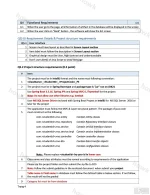
Q4) View function
Q4 Functional Requirements
4.1 When the user go to the page, all information of artifact in the database will be displayed in the screen
4.2 When the user click on "Back" button , the software will show the list screen
Q5) UI Requirement Details & Project structure requirements
Q5.1 User interface
1 | Screen must have layout as described in Screen Layout section
2 | Item label must follow the description in Screen Layout section
3 | Graphical design must be clear, high contrast and understandable
4 | Don't user alert() of Java Script to show message
Q5.2 Project structure requirements (0.5 point)
# | Item
1 | The project must be in IntelliJ format and the name must following convention : <ClassName>_<StudentID>_<ProjectCode>_PE
2 | The project must be in Spring Boot type and package type is "jar" run on JDK21
3 | Use Spring Boot 3.5.16, Spring JPA and Spring MVC 6, Thymeleaf for the project. Note: Do not allow use other libraries e.g. lombok
4 | User MS SQL Server Driver enclosed with Spring Boot Project in IntelliJ for MS SQL Server 2016 or later for the project
5 | The application must follow the MVC & Layer structural pattern. The package of java code must construct as the following
com.<studentId>.mvc.entity Contain entity classes
com.<studentId>.mvc.repository Contain Repository Interface classes
com.<studentId>.mvc.service Contain service Interface classes
com.<studentId>.mvc.service.impl Contain service implementation classes
com.<studentId>.mvc.controller Contain controller classes
com.<studentId>.mvc.dto Contain data transfer objects
com.<studentId>.mvc Contain configuration classes
Note : Please replace <studentId> by your id in lower case
6 | Class name and class attributes must be named according to requirements of the application
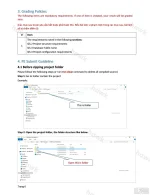
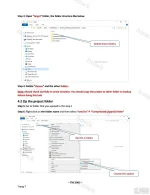
7 | Please zip the project folder and then submit the zip file to EOS. Note: Follow the submit guideline in the enclosed document when submit your project
8 | Table name & Field name in database must follow the defined table in below section. If not follow, the result will not be graded
9 | Category list must be from database
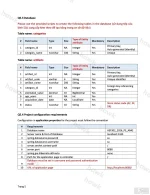
Q5.3 Database
Please use the provided scripts to create the following tables in the database (sử dụng tệp câu lệnh SQL cung cấp kèm theo để tạo bảng trong cơ sở dữ liệu)
Table name: categories
# | Field name | Type | Size | Type of Entity attribute | Mandatory | Description
1 | category_id | int | NA | Integer | Yes | Primary Key, Auto generated (Identity)
2 | category_name | nvarchar | 100 | String | Yes | Unique
Table name: artifacts
# | Field name | Type | Size | Type of Entity attribute | Mandatory | Description
1 | artifact_id | int | NA | Integer | Yes | Primary Key, Auto generated (Identity)
2 | artifact_code | varchar | 6 | String | Yes | Unique identifier
3 | artifact_name | nvarchar | 200 | String | Yes |
4 | category_id | int | NA | Integer | Yes | Foreign Key referencing categories
5 | estimated_value | decimal | 10 | BigDecimal | Yes |
6 | age_years | int | NA | int | Yes |
7 | acquisition_date | date | NA | LocalDate | Yes |
8 | status | nvarchar | 10 | String | Yes | Store status code (AC, IN, DR)
Q5.4 Project configuration requirements
Configuration in application.properties for the project must follow the convention
# | Requirements
1 | Database name | HSF302_2026_PE_AMG
2 | Server name & Port of Database | localhost:1433
3 | spring.datasource.password | sa
4 | spring.datasource.username | sa
5 | server.servlet.context-path | /
6 | server.port | 8080
7 | spring.jpa.hibernate.ddl-auto | none
8 | Path for the application page in controller | /
9 | Database must be set in username and password authentication mode |
10 | URL of application page |You do not have permission to view link Đăng nhập hoặc Đăng ký.
Đính kèm
-
 HSF302 SU26 PE RE_01.webp150.1 KB · Lượt xem: 54
 -
 HSF302 SU26 PE RE_02.webp100.9 KB · Lượt xem: 52
 -
 HSF302 SU26 PE RE_03.webp153.8 KB · Lượt xem: 44
 -
 HSF302 SU26 PE RE_04.webp230.6 KB · Lượt xem: 42
 -
 HSF302 SU26 PE RE_05.webp184.1 KB · Lượt xem: 39
 -
 HSF302 SU26 PE RE_06.webp128.5 KB · Lượt xem: 33
 -
 HSF302 SU26 PE RE_07.webp133.2 KB · Lượt xem: 56
Sửa lần cuối:

