


- Học kỳ
- SU2026
- Thời Gian
- 8/8/26
- Loại tài liệu
- PE
PRN212 SU26 PE RE
Hướng dẫn chi tiết bài thi thực hành môn PRN212
Tài liệu này cung cấp các hướng dẫn và yêu cầu quan trọng cho kỳ thi thực hành môn PRN212 gồm hai phần chính. Người học sẽ thực hiện ứng dụng console quản lý đặt chỗ ngồi sự kiện và ứng dụng WPF quản lý thực đơn nhà hàng kết nối cơ sở dữ liệu. Phần chi tiết của ứng dụng nhà hàng yêu cầu xây dựng giao diện hiển thị dữ liệu qua DataGrid, tích hợp bộ lọc danh mục, cùng với các chức năng thêm mới và kiểm tra tính hợp lệ của dữ liệu.PRN212 Practical Examination Instructions and Requirements
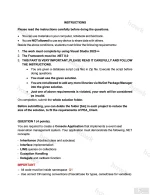
INSTRUCTIONS
Please read the instructions carefully before doing the questions.
- You can use materials in your computer, notebook and text book.
- You are NOT allowed to use any device to share data with others.
Beside the above conditions, students must follow the following requirements:
1. The work must complete by using Visual Studio 2022++
2. The Framework must be .NET 8.0
3. THIS PART IS VERY IMPORTANT, PLEASE READ IT CAREFULLY AND FOLLOW THE INSTRUCTIONS.
- You are given a database script (.sql file) in Zip file. Execute the script before doing questions.
- You must use the given solution.
- You are not allowed to add any more libraries via NuGet Package Manager into the given solution.
- Just one of above requirements is violated, your work will be considered as invalid.
On completion, submit the whole solution folder.
Before submitting, you can delete the folder [bin] in each project to reduce the size of the solution, to fit the requirements of PEA_Client.
QUESTION 1 (4 points).
You are required to create a Console Application that implements a event seat reservation management system. Your application must demonstrate the following .NET concepts:
- Inheritance (Abstract class and subclass)
- Interface implementation
- LINQ queries on collections
- Exception Handling
- Delegate and callback function
IMPORTANT
- All code must be inside namespace Q1
- Use correct C# naming conventions (PascalCase for types, camelCase for variables)
- All classes, interfaces, and delegates must be public
- Implement ALL members exactly as specified (name, return type, parameters)
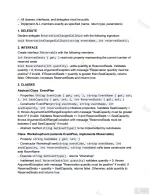
1. DELEGATE
Declare delegate ReservationChangedCallback with the following signature:
void ReservationChangedCallback(string eventName, int reservedSeats);
2. INTERFACE
Create interface IReservable with the following members:
int ReservedSeats { get; } read-only property representing the current number of reserved seats
bool ReserveSeats(int quantity) - adds quantity to ReservedSeats. Validates quantity > 0; throws ArgumentException with message "Reservation quantity must be positive" if invalid. If ReservedSeats + quantity is greater than SeatCapacity, returns false. Otherwise, increases ReservedSeats and returns true.
3. CLASSES
Abstract Class EventPlan
- Properties: string EventCode { get; set; }, string EventName { get; set; }, int SeatCapacity { get; set; }, int ReservedSeats { get; set; }
- Constructor EventPlan(string eventCode, string eventName, int seatCapacity, int reservedSeats) initializes properties. Validates SeatCapacity > 0; throws ArgumentOutOfRangeException with message "SeatCapacity must be greater than 0" if invalid. Validates ReservedSeats >= 0 and ReservedSeats <= SeatCapacity; throws ArgumentOutOfRangeException with message "ReservedSeats must be between 0 and SeatCapacity" if invalid.
- Abstract method string GetEventType() to be implemented by subclasses
Class WorkshopEvent (extends EventPlan, implements IReservable)
- Property: string RoomName { get; set; }
- Constructor WorkshopEvent(string eventCode, string eventName, int seatCapacity, int reservedSeats, string roomName) calls base constructor and sets RoomName
- Override string GetEventType() - returns "Workshop"
- Implement bool ReserveSeats(int quantity) validates quantity > 0, throws ArgumentException with message "Reservation quantity must be positive" if invalid. If ReservedSeats + quantity > SeatCapacity, returns false. Otherwise, adds quantity to ReservedSeats and returns true.
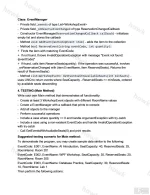
Class EventManager
- Private field _events of type List<WorkshopEvent>
- Private field _onReservationChanged of type ReservationChangedCallback
- Constructor EventManager(ReservationChangedCallback callback) - initializes empty list and stores the callback
- Method void AddEvent(WorkshopEvent item) - adds the item to the collection
- Method bool ReserveEvent(string eventCode, int quantity):
+ Finds the item with matching EventCode
+ If not found, throws InvalidOperationException with message "Event not found: {eventCode}"
+ If found, calls item.ReserveSeats(quantity). If the operation was successful, invokes _onReservationChanged with (item.EventName, item.ReservedSeats). Returns the result of ReserveSeats()
- Method List<WorkshopEvent> GetEventsWithAvailableSeats(int minSeats) - uses LINQ to return events where SeatCapacity - ReservedSeats >= minSeats, ordered by available seats descending
4. TESTING (Main Method)
Write your own Main method that demonstrates all functionality:
- Create at least 3 WorkshopEvent objects with different RoomName values
- Create a EventManager with a callback that prints to console
- Add all objects to the manager
- Perform successful operations
- Include a case where quantity <= 0 and handle ArgumentException with try-catch
- Include a case using a non-existent EventCode and handle InvalidOperationException with try-catch
- Call GetEventsWithAvailableSeats(5) and print results
Suggested testing scenario for Main method:
To demonstrate the program, you may create sample data similar to the following:
EventCode: E001, EventName: AI Introduction, SeatCapacity: 40, ReservedSeats: 25, RoomName: Room 201
EventCode: E002, EventName: WPF Workshop, SeatCapacity: 35, ReservedSeats: 20, RoomName: Room 305
EventCode: E003, EventName: Database Practice, SeatCapacity: 30, ReservedSeats: 10, RoomName: Lab 1
Then perform the following actions:
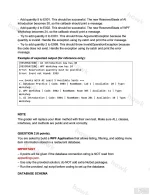
- Add quantity 5 to E001. This should be successful. The new ReservedSeats of AI Introduction becomes 30, so the callback should print a message.
- Add quantity 4 to E002. This should be successful. The new ReservedSeats of WPF Workshop becomes 24, so the callback should print a message.
- Try to add quantity 0 to E001. This should throw ArgumentException because the quantity is invalid. Handle the exception using try-catch and print the error message.
- Try to add quantity 2 to E999. This should throw InvalidOperationException because the code does not exist. Handle the exception using try-catch and print the error message.
Example of expected output (for reference only):
[RESERVATION]: AI Introduction now has 30
[RESERVATION]: WPF Workshop now has 24
Error: Reservation quantity must be positive
Error: Event not found: E999
=== Events With At Least 5 Available Seats ===
1. Database Practice | Code: E003 | RoomName: Lab 1 | Available: 20 | Type: Workshop
2. WPF Workshop | Code: E002 | RoomName: Room 305 | Available: 11 | Type: Workshop
3. AI Introduction | Code: E001 | RoomName: Room 201 | Available: 10 | Type: Workshop
NOTE
The grader will replace your Main method with their own test. Make sure ALL classes, interfaces, and methods are public and work correctly.
QUESTION 2 (6 points).
You are asked to build a WPF Application that allows listing, filtering, and adding menu item information stored in a restaurant database.
IMPORTANT
- 0 points will be given if the database connection string is NOT read from appsettings.json.
- Use only the provided solution; do NOT add extra NuGet packages.
- Run the provided .sql script before coding to set up the database.
DATABASE SCHEMA
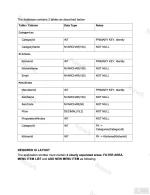
The database contains 3 tables as described below:
Table / Column | Data Type | Notes
Categories
CategoryId | INT | PRIMARY KEY, Identity
CategoryName | NVARCHAR(100) | NOT NULL
Kitchens
KitchenId | INT | PRIMARY KEY, Identity
KitchenName | NVARCHAR(100) | NOT NULL
Email | NVARCHAR(150) | NOT NULL
MenuItems
MenuItemId | INT | PRIMARY KEY, Identity
ItemName | NVARCHAR(150) | NOT NULL
ItemCode | NVARCHAR(50) | NOT NULL
Price | DECIMAL(18,2) | NOT NULL
PreparationMinutes | INT | NOT NULL
CategoryId | INT | FK -> Categories(CategoryId)
KitchenId | INT | FK -> Kitchens(KitchenId)
REQUIRED UI LAYOUT
The application window must contain 3 clearly separated areas: FILTER AREA, MENU ITEM LIST and ADD NEW MENU ITEM as following
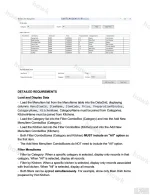
PRN212 SU26 PE RE_006 and RE_007 Menu Item Management Requirements
DETAILED REQUIREMENTS
Load and Display Data
- Load the Menuitem list from the MenuItems table into the DataGrid, displaying columns: MenuItemId, ItemName, ItemCode, Price, PreparationMinutes, CategoryName, KitchenName. CategoryName must be joined from Categories. KitchenName must be joined from Kitchens.
- Load the Category list into the Filter ComboBox (Category) and into the Add New Menuitem ComboBox (Category).
- Load the Kitchen list into the Filter ComboBox (Kitchen) and into the Add New Menuitem ComboBox (Kitchen).
- Both Filter ComboBoxes (Category and Kitchen) MUST include an "All" option as the first item.
- The Add New Menuitem ComboBoxes do NOT need to include the "All" option.
Filter MenuItems
- Filter by Category: When a specific category is selected, display only records in that category. When "All" is selected, display all records.
- Filter by Kitchen: When a specific kitchen is selected, display only records associated with that kitchen. When "All" is selected, display all records.
- Both filters can be applied simultaneously. For example, show only Main Dish items prepared by Hot Kitchen.
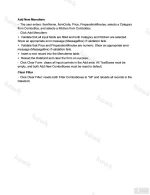
Add New Menuitem
- The user enters: ItemName, ItemCode, Price, PreparationMinutes, selects a Category from ComboBox, and selects a Kitchen from ComboBox.
- Click Add Menuitem:
+ Validate that all input fields are filled and both Category and Kitchen are selected. Show an appropriate error message (MessageBox) if validation fails.
+ Validate that Price and PreparationMinutes are numeric. Show an appropriate error message (MessageBox) if validation fails.
+ Insert a new record into the MenuItems table.
+ Reload the DataGrid and clear the form on success.
- Click Clear Form: clears all input controls in the Add area. All TextBoxes must be empty, and both Add New ComboBoxes must be reset to default.
Clear Filter
- Click Clear Filter: resets both Filter ComboBoxes to "All" and reloads all records in the DataGrid.
Đính kèm
-
 PRN212 SU26 PE RE_001.webp194.4 KB · Lượt xem: 62
 -
 PRN212 SU26 PE RE_002.webp277.4 KB · Lượt xem: 53
 -
 PRN212 SU26 PE RE_003.webp256.1 KB · Lượt xem: 54
 -
 PRN212 SU26 PE RE_004.webp210.4 KB · Lượt xem: 47
 -
 PRN212 SU26 PE RE_005.webp99.4 KB · Lượt xem: 42
 -
 PRN212 SU26 PE RE_006.webp190.2 KB · Lượt xem: 23
 -
 PRN212 SU26 PE RE_007.webp111 KB · Lượt xem: 63

