


- Học kỳ
- SU2026
- Thời Gian
- 8/8/26
- Loại tài liệu
- PE
PRN222 SU26 PE RE NO2
Hướng dẫn chi tiết bài thi thực hành PRN222
Tài liệu này cung cấp các hướng dẫn và yêu cầu chi tiết cho bài thi thực hành PRN222 bao gồm hai câu hỏi chính. Nhiệm vụ đầu tiên là phát triển ứng dụng console .NET 8 kết nối với máy chủ TCP, trong khi nhiệm vụ thứ hai yêu cầu xây dựng ứng dụng web quản lý đánh giá sản phẩm. Đề thi cũng nêu rõ các đặc tả kỹ thuật cho trang danh sách, các bộ lọc tìm kiếm theo sản phẩm và điểm tối thiểu. Ngoài ra, sinh viên cần hoàn thiện biểu mẫu thêm đánh giá mới và tuân thủ bảng tóm tắt ID phần tử HTML được quy định sẵn.PRN222 Practical Examination Paper No. 2
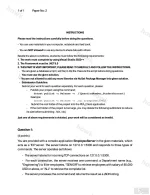
INSTRUCTIONS
Please read the instructions carefully before doing the questions.
- You can use materials in your computer, notebook and text book.
- You are NOT allowed to use any device to share data with others.
Beside the above conditions, students must follow the following requirements:
1. The work must complete by using Visual Studio 2022++
2. The Framework must be .NET 8.0
3. THIS PART IS VERY IMPORTANT, PLEASE READ IT CAREFULLY AND FOLLOW THE INSTRUCTIONS.
- You are given a database script (.sql file) in Zip file. Execute the script before doing questions.
- You must use the given solution.
- You are not allowed to add any more libraries via NuGet Package Manager into given solution.
- Submission Guideline:
Submit your work for each question separately. For each question, please:
- Publish your project using the command:
dotnet publish -c Release -o ./[QuestionNumber_StudentAccount]
Example:
dotnet publish -c Release -o ./Q1_trungnthe123432
- Submit the root folder of the project into the PEA_Client application.
- If the root folder of the project is too large, you may delete the following subfolders to reduce its size before submitting: /bin, /obj
Just one of above requirements is violated, your work will be considered as invalid.
Question 1:
(4 points)
You are provided with a console application EmployeeServer in the given materials, which acts as a TCP server. The server listens on 127.0.0.1:5300 and responds to three types of commands. The server operates as follows:
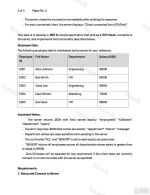
- The server listens for incoming TCP connections on 127.0.0.1:5300.
- For each connection, the server receives one command: a Department name (e.g., "Engineering") to filter employees, "SENIOR" to retrieve employees with salary of 80,000 USD or above, or "ALL" to retrieve the complete list.
- The server processes the command and returns the result as a JSON string.
- The server closes the connection immediately after sending the response.
- For each connected client, the server displays: "Client connected from {IP}:{Port}"
Your task is to develop a .NET 8 console application that acts as a TCP client, connects to the server, and implements the functionality described below.
Employee Data
The following employee data is maintained by the server for your reference.
Employee ID | Full Name | Department | Salary (USD)
E001 | Alice Johnson | Engineering | 85000
E002 | Bob Smith | HR | 65000
E003 | Carol Lee | Engineering | 90000
E004 | David Brown | Marketing | 72000
E005 | Eva Davis | HR | 68000
Important Notes:
- The server returns JSON with field names exactly: "employeeId", "fullName", "department", "salary".
- The error response JSON field names are exactly: "department", "status", "message".
- Department names are case-sensitive when sending to the server.
- The commands "ALL" and "SENIOR" must be sent exactly as uppercase.
- "SENIOR" returns all employees across all departments whose salary is greater than or equal to 80000.
- Zero (0) marks will be awarded for any requirement if the client does not correctly connect to or communicate with the server as specified.
Requirements:
1. Setup and Connect to Server
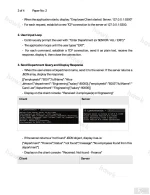
- When the application starts, display: "Employee Client started. Server: 127.0.0.1:5300"
- For each request, establish a new TCP connection to the server at 127.0.0.1:5300.
2. User Input Loop
- Continuously prompt the user with: "Enter Department (or SENIOR / ALL / EXIT):"
- The application loops until the user types "EXIT".
- For each command, establish a TCP connection, send it as plain text, receive the response, display it, then close the connection.
3. Send Department Query and Display Response
- When the user enters a Department name, send it to the server. If the server returns a JSON array, display the response:
[{"employeeId":"E001","fullName":"Alice Johnson","department":"Engineering","salary":85000},{"employeeId":"E003","fullName":"Carol Lee","department":"Engineering","salary":90000}]
- Display on the client console: "Received: 2 employee(s) in Engineering"
- If the server returns a "not found" JSON object, display it as-is:
{"department":"Finance","status":"not found","message":"No employees found from this department"}
- Display on the client console: "Received: Not found - Finance"
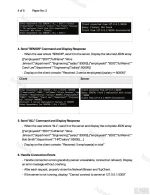
4. Send "SENIOR" Command and Display Response
- When the user enters "SENIOR", send it to the server. Display the returned JSON array:
[{"employeeId":"E001","fullName":"Alice Johnson","department":"Engineering","salary":85000},{"employeeId":"E003","fullName":"Carol Lee","department":"Engineering","salary":90000}]
- Display on the client console: "Received: 2 senior employee(s) (salary >= 80000)"
5. Send "ALL" Command and Display Response
- When the user enters "ALL", send it to the server and display the complete JSON array:
[{"employeeId":"E001","fullName":"Alice Johnson","department":"Engineering","salary":85000},{"employeeId":"E002","fullName":"Bob Smith","department":"HR","salary":65000},...]
- Display on the client console: "Received: 5 employee(s) in total"
6. Handle Connection Errors
- Handle connection errors gracefully (server unavailable, connection refused). Display an error message without crashing.
- After each request, properly close the NetworkStream and TcpClient.
- If the server is not running, display: "Cannot connect to server at 127.0.0.1:5300"
Additional Notes:
- Use try-catch blocks for exception handling.
- Use using statements or try-finally blocks for proper disposal of NetworkStream and TcpClient.
- The client uses a request-response model: one new connection per command, close after receiving the response.
- Parse the server's JSON response using System.Text.Json or Newtonsoft.Json.
- The salary field in the JSON response is a number. Example: "salary":85000.
Question 2:
Product Review Management
(6 points)
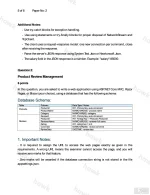
In this question, you are asked to write a web application using ASP.NET Core MVC, Razor Pages, or Blazor (your choice), using a database that has the following schema:
Database Schema:
Table | Column | Data Type / Notes
Products | ProductId | INT - Primary Key, auto-increment
Products | ProductName | NVARCHAR(100) - product name
Products | Category | NVARCHAR(50) - category
Reviews | ReviewId | INT - Primary Key, auto-increment
Reviews | ProductId | INT - Foreign Key -> Products.ProductId
Reviews | ReviewerName | NVARCHAR(100) - reviewer full name
Reviews | Rating | INT - rating from 1 to 5
Reviews | Comment | NVARCHAR(250) - review comment
Reviews | ReviewDate | DATETIME - review date
1. Important Notes:
- It is required to assign the URL to access the web pages exactly as given in the requirements. A wrong URL means the examiner cannot access the page, and you will receive zero marks for that feature.
- Zero marks will be awarded if the database connection string is not stored in the file appsettings.json.
PRN222 SU26 PE RE Paper No. 2
Paper No: 2
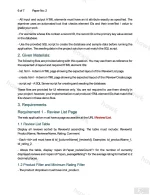
- All input and output HTML elements must have an id attribute exactly as specified. The examiner uses an automated tool that checks element IDs and their innerText / value to grade your work.
- For elements whose IDs contain a record ID, the record ID is the primary key value stored in the database.
- Use the provided SQL script to create the database and sample data before running the application. The seeding data in the project solution must match the SQL script.
2. Given Materials:
The following files are provided along with this question. You may use them as reference for the expected UI layout and required HTML element IDs:
- list.html - A demo HTML page showing the expected layout of the /Review/List page.
- create.html - A demo HTML page showing the expected layout of the /Review/Create page.
- script.sql - A SQL Server script for creating and seeding the database.
These files are provided for UI reference only. You are not required to use them directly in your project; however, your implementation must produce HTML element IDs that match the IDs shown in these demo files.
3. Requirements
Requirement 1 - Review List Page
The web application must have a page accessible at the URL /Review/List.
1.1 Review List Table
Display all reviews sorted by ReviewId ascending. The table must include: ReviewId, ProductName, ReviewerName, Rating, Comment.
- Each <td> cell must have id td_{columnName}_{reviewId}. Examples: td_productName_1, td_rating_2.
- Above the table, display <span id="span_reviewCount"> for the number of currently displayed reviews and <span id="span_averageRating"> for the average rating formatted to 2 decimal places.
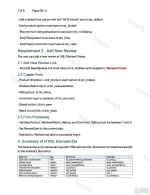
1.2 Product Filter and Minimum Rating Filter
- The product dropdown must have id sl_product.
- Add a default first option with text "All Products" and id opt_default.
- Each product option must have id opt_{index}.
- The minimum rating dropdown must have id sl_minRating.
- The [Filter] button must have id btn_filter.
- The [Clear] button/link must have id btn_clear.
Requirement 2 - Add New Review
The user can add a new review at URL /Review/Create.
2.1 Add New Review Link
- The [Add New Review] link must have id lnk_addNew and navigate to /Review/Create.
2.2 Create Form
- Product dropdown: id sl_product; each option id opt_{index}.
- ReviewerName input: id txt_reviewerName.
- Rating input: id txt_rating.
- Comment input or textarea: id txt_comment.
- [Save] button: id btn_save.
- [Back to List] link: id btn_back.
2.3 Form Processing
- Validate Product, ReviewerName, Rating, and Comment. Rating must be between 1 and 5.
- Set ReviewDate to the current date.
- Redirect to /Review/List after a successful insert.
4. Summary of HTML Element IDs
The table below summarises all required HTML element IDs. Elements not listed here are left to the student's discretion.
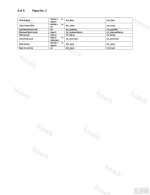
Element | Tag | ID Format | Example
Each cell in review table | <td> | td_{columnName}_{reviewId} | td_rating_1
Review count | <span> | span_reviewCount | span_reviewCount
Average rating | <span> | span_averageRating | span_averageRating
Product filter dropdown | <select> | sl_product | sl_product
Default option | <option> | opt_default | opt_default
Each product option | <option> | opt_{index} | opt_1
Minimum rating dropdown | <select> | sl_minRating | sl_minRating
Filter button | <button> or <input> | btn_filter | btn_filter
Clear button/link | <button> or <a> | btn_clear | btn_clear
Add New Review link | <a> | lnk_addNew | lnk_addNew
ReviewerName input | <input> | txt_reviewerName | txt_reviewerName
Rating input | <input> | txt_rating | txt_rating
Comment input | <input> or <textarea> | txt_comment | txt_comment
Save button | <button> or <input> | btn_save | btn_save
Back to List link | <a> | btn_back | btn_back
Đính kèm
-
 PRN222 SU26 PE RE NO2_001.webp213.4 KB · Lượt xem: 40
 -
 PRN222 SU26 PE RE NO2_002.webp167.1 KB · Lượt xem: 36
 -
 PRN222 SU26 PE RE NO2_003.webp180.6 KB · Lượt xem: 30
 -
 PRN222 SU26 PE RE NO2_004.webp206.3 KB · Lượt xem: 31
 -
 PRN222 SU26 PE RE NO2_005.webp176.1 KB · Lượt xem: 25
 -
 PRN222 SU26 PE RE NO2_006.webp228.3 KB · Lượt xem: 19
 -
 PRN222 SU26 PE RE NO2_007.webp185.9 KB · Lượt xem: 16
 -
 PRN222 SU26 PE RE NO2_008.webp50.2 KB · Lượt xem: 34

